MAHANAKHON RACING Customize and Tune Your Bike
Use P at customization points, understand piston sizes, exhaust, dyno screens, and clip Stage names.
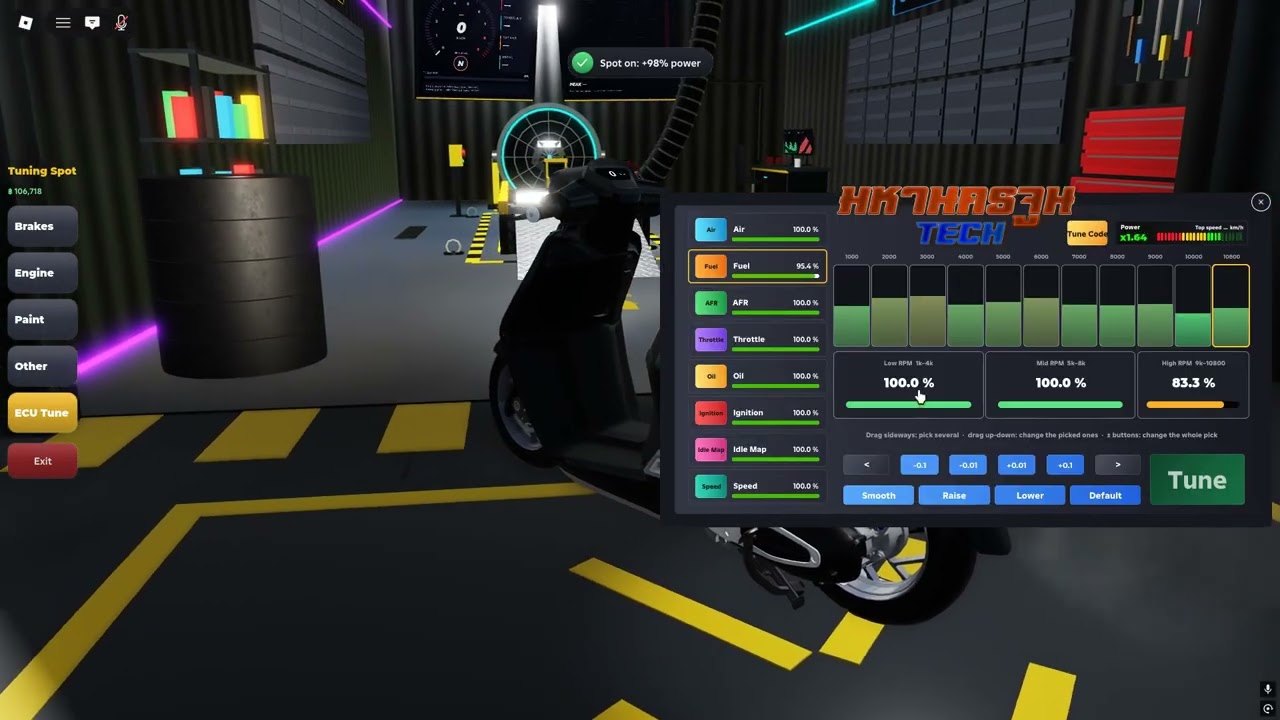
Customization is half the fantasy in MAHANAKHON RACING: Thai street scooters and motorcycles, loud pipes, and garage walls that show dyno curves in official art. This guide explains how to open the shop correctly, what community clips mean by piston sizes and Stage names, and how to spend Cash without confusing tune recipes for redeem codes.
You should already be able to spawn and ride. If not, use Getting Started and the controls map first. Earn a Cash buffer with jobs before you max every slider.
How to open customization
- Ride or warp (N) to a customization point on the map.
- Stop in the interact zone.
- Press P to open customize.
P is location-gated. The official Roblox how-to states customize works at the customize spot — mashing P in a random alley fails on purpose. L toggles decorative lights and is not the shop. If lights were all you wanted, stay on L; if you want parts, find the point and press P.
Hold J to store a bike when you are swapping platforms or clearing space outside a busy shop door.
Cash, fuel, and repair before you tune
Tuning spends Cash. Running the bike still spends fuel, and crashes still need repair. Those meters are separate: filling fuel will not fix bent parts, and a repair ticket will not refill an empty tank. Players who dump every code reward into cosmetics then strand themselves mid-delivery. Keep a reserve, then upgrade.
Promo codes from the codes hub accelerate the first shopping trip. Jobs refill the wallet afterward.
Piston sizes named in clips
Public Thai and English clips repeatedly name piston sizes 62, 72, 80, and 90. In community language these are power steps players buy or chase, not Store redeem strings. Exact horsepower numbers are rarely published; treat the sequence as a ladder of stronger (and usually pricier) options rather than a guaranteed dyno screenshot.
Practical approach:
- Note your current piston label if the UI shows one.
- Buy the next step you can afford after a Cash buffer.
- Test on the same straight road before and after so feel changes are obvious.
- Do not assume a 90 piston alone beats map knowledge, brake timing, and a fueled tank.
Player chat also mentions timed world vendors for pistons on short rotations. If a seller is missing, wait a cycle or earn elsewhere instead of assuming the feature was removed.
Exhaust, body, and show parts
Exhaust swaps (ท่อ in Thai clip talk) are another common customize topic. Louder or different pipes show up in “new system” videos alongside body and light work. Cosmetics and performance parts can share the same P menu depending on the build — read each category before confirming a purchase.
Decorative underglow and show lighting may still use L outside the menu. Confirm whether a look is a key toggle or a paid part so you do not double-buy.
Dyno screens and Stage naming
Official promotional art shows a dyno style graph on a garage wall. Clips and titles also say Stage (for example Stage 3) when creators show a parts stack. Important distinctions:
- Dyno in art proves the fantasy of measuring power; it does not automatically publish a public leaderboard of verified numbers.
- Stage in a title is usually a creator’s name for a recipe, not a single global certified tune ID.
- โค้ดจูน / tune code in Thai social posts typically means “parts recipe,” not a string for Store → Codes.
If two clips disagree on the “best” PCX or scooter stack, believe neither blindly. Build what you can afford, test on your route, and compare bikes with the tier list for broader context.
Suggested first tune path
- Redeem working codes.
- Complete at least one QuickRider delivery so you know travel time on your bike.
- Fuel up and repair if needed.
- Open P at a customize point.
- Buy one meaningful performance step (often the next piston size) or one exhaust you like.
- Re-test startup (G E R K W) and a short wheelie (Ctrl) to feel the change.
- Save screenshots with Y free cam if you want a before/after garage shot.
Avoid spending the entire balance on every cosmetic row in one visit. Servers are social; a clean running delivery bike beats a parked showpiece you cannot afford to refuel.
Myths to ignore
- “Paste this tune code in Codes.” Wrong box. Recipes stay in customize; redeem codes stay on the codes page.
- “P works everywhere.” Official text ties P to the customize point.
- “Fuel fixes damage.” Separate systems — see troubleshooting.
- “One Stage 3 video is the meta forever.” Patches and bike models differ; re-check updates.
Related guides
- Controls — P, L, J, Y, and the rest of the keyboard
- Earn Cash — fund the shopping list
- Getting Started — ride before you tune
- Troubleshooting — shop will not open or bike feels worse after a buy
- Tier List — which platforms people chase
- Guides Hub — all how-tos
Customize when the bike already starts, stops, and earns. Use P at the point, climb piston sizes deliberately, treat Stage names as recipes, and keep Cash for fuel and repair so the next job still pays.
Frequently Asked Questions
Quick answers for MAHANAKHON RACING riders.
How do I customize in MAHANAKHON RACING?
Ride to a customization point and press P. L only toggles decorative lights and will not open the shop.
What do piston sizes 62, 72, 80, and 90 mean?
Community clips name those piston steps as power options you buy with Cash. They are not Store redeem codes.
Is a tune code the same as a promo code?
No. Promo codes use Store → Codes. Tune talk usually means a parts recipe (piston, exhaust, Stage label).
What is the dyno in official art?
Promo garage art shows a dyno-style power graph. Use it as flavor and testing fantasy, not as a single published meta sheet.
Should I tune before learning jobs?
Earn a Cash buffer with codes and at least one delivery first so fuel, repair, and parts do not strand you.